
[How-To] Using Signshop
14 posts
• Page 1 of 1
- jesskitten
-

- Posts: 22
- Joined: 25 Apr 2012, 13:55
- Location: Trouble
- Minecraft username: jesskitten
[How-To] Using Signshop
 by jesskitten » 21 May 2012, 00:34
Note to mods: Here's my attempt at a guide. Don't feel obliged to have to use it! Also feel free to edit or cut it down a bit or whatever. 
Hello! This is a screenshot tutorial of how to create the four basic and most common types of Signshop signs, [Buy], [Sell], [Donate] and [DonateHand]. Actually [Donate] signs are very rare but they're a hybrid of the [Buy]/[Sell] ones and the [DonateHand] ones, and I had an extra sign on hand, so I put that in too. Sorry.
SOME COMMON BUGS
- If you are setting up a [Buy] or [Sell] sign, DO NOT INCLUDE MORE THAN ONE PERIOD IN THE LAST LINE (price). The item will be flagged as being on sale for 0.00 coins!
- You cannot use signs while holding dye items (bonemeal, cacti, lapis lazuli, etc) because they're linked to some sign replace function in the Signshop code. Therefore you cannot donate them, nor redstone dust, using [DonateHand] signs, even though that Signshop functionality is disabled for us mortals. Regular [Buy], [Sell] and [Donate] signs work though as we do not have to be holding those items to use those signs.
- As of last patch, the first line of the sign ([Buy], [Sell], etc) gets indented weirdly once the link between the sign and chest has been set up. Looks very strange.
- As of last patch, you sometimes cannot break a sign ([Buy], [Sell], etc) once the link has been set up and the first line has turned blue. To get around this, break the block the sign is attached to and it should pop free.
This guide hasn't been updated for the latest plugin version. The only difference is that you must punch the chest before the sign.
Selling items ([Buy] signs)
[Buy] Signs allow the player to buy things from you - if you are the owner of a shop and want to sell things to customers, this is the sign you want to use.
To create a [Buy] sign, place a sign with the following syntax:
- The first line has to just contain the text: [Buy]
- The second and third line can contain any text. These are commonly used to describe the item/s on sale.
- The fourth line can contain any text, but must contain a number in the form X, or X.YZ on the line somewhere. It doesn't matter if you put $X.YZ, X pennies, X cheetoes, or whatever currency you want to call it. The number just has to be there.
For example,
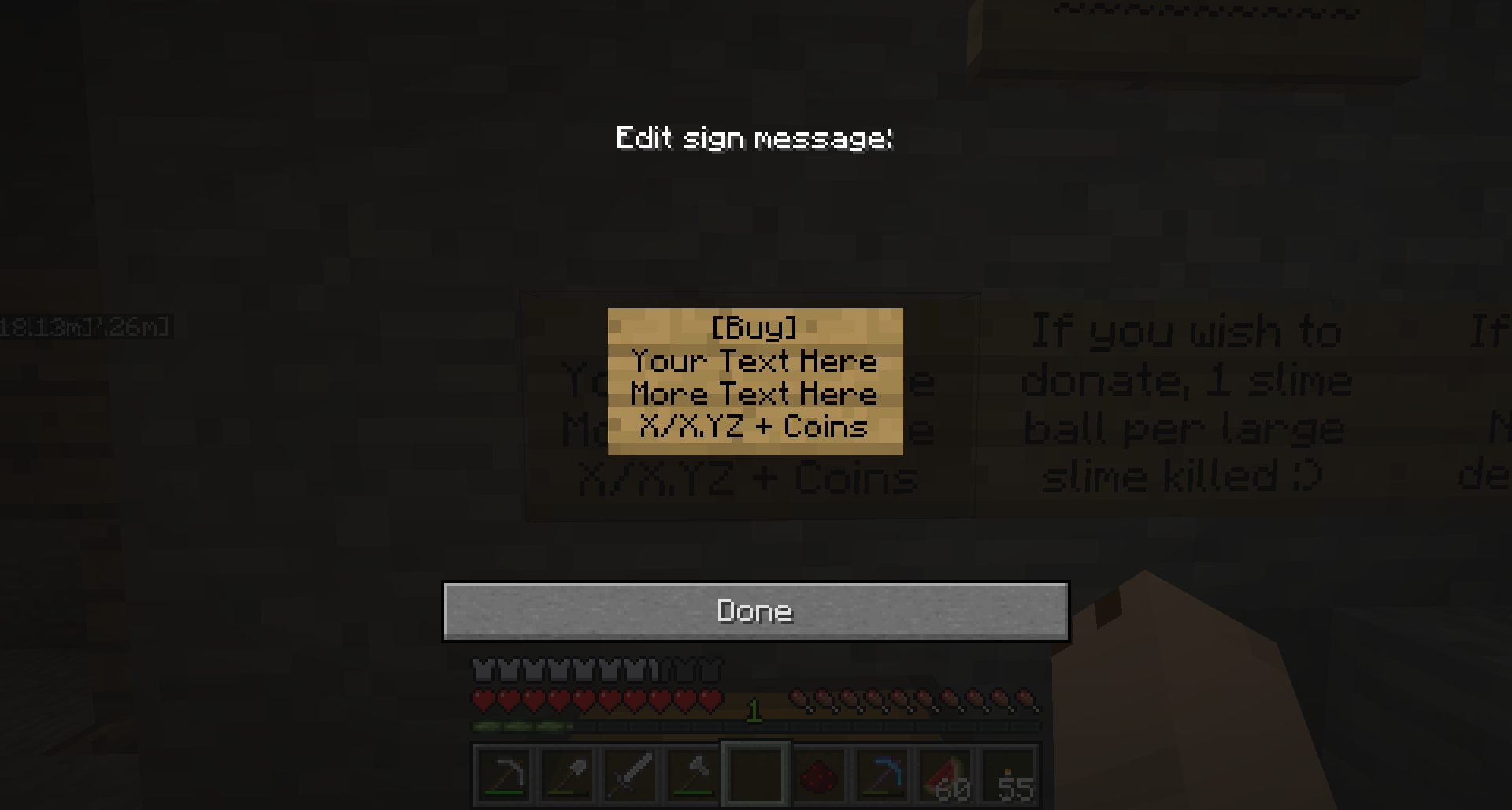
You must also ensure you select a target chest, and fill it with EXACTLY the type and number of items you want to sell per transaction. Be careful, if you wanted to sell 1 diamond, and you put a stack of 5 in and set up the connection between the sign and the chest, it will sell all 5 diamonds to the first person that clicks on the sign wanting to buy one! Instead you must put 1 diamond in, set up the connection, and then put the other 4 in to make sure your shop has enough stock.
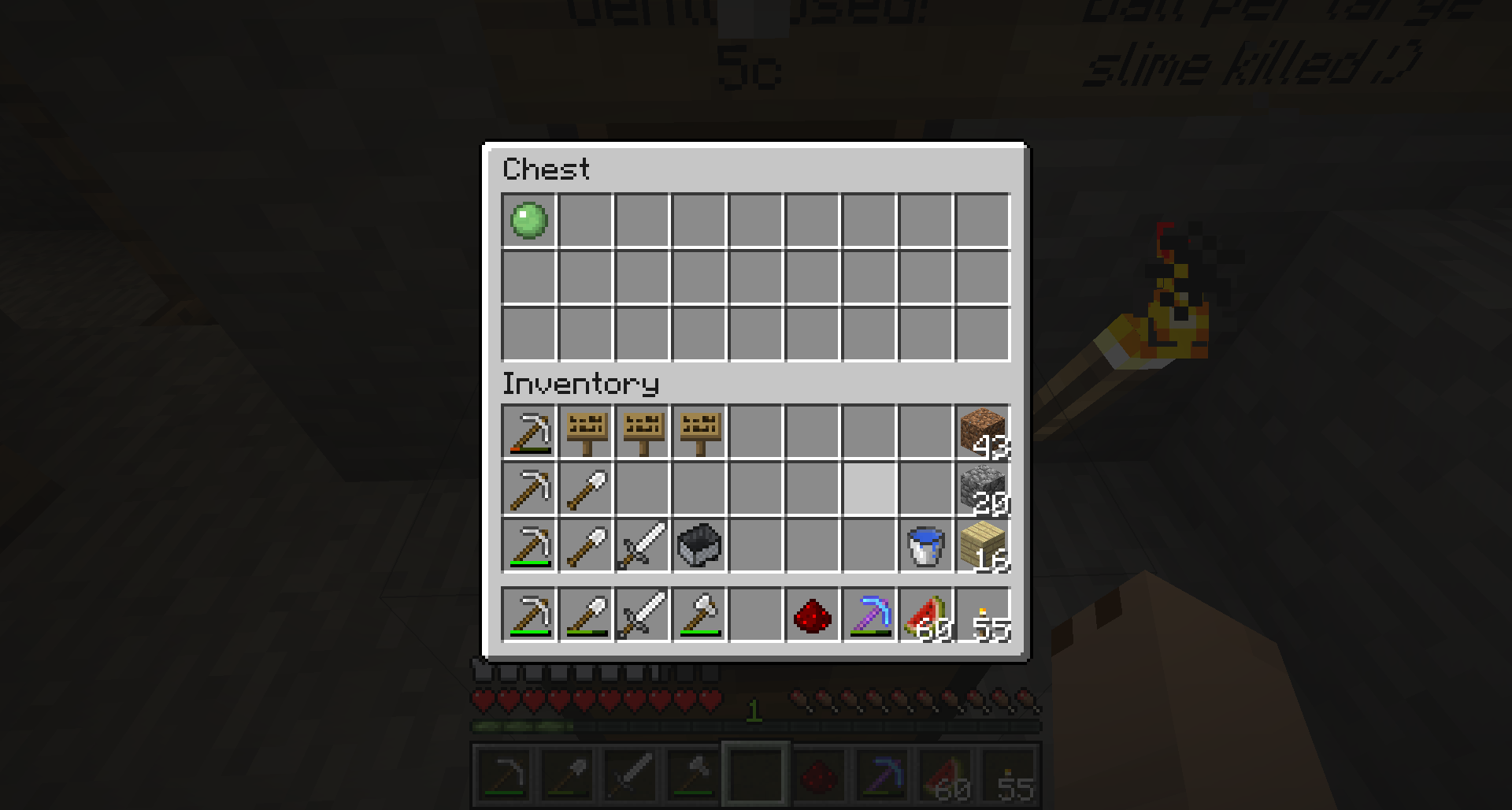
So in this case, I will set up a sign to sell 1 slime ball for 5 coins. First I ensure that there is exactly 1 slime ball in the chest I want to use to store my stock.
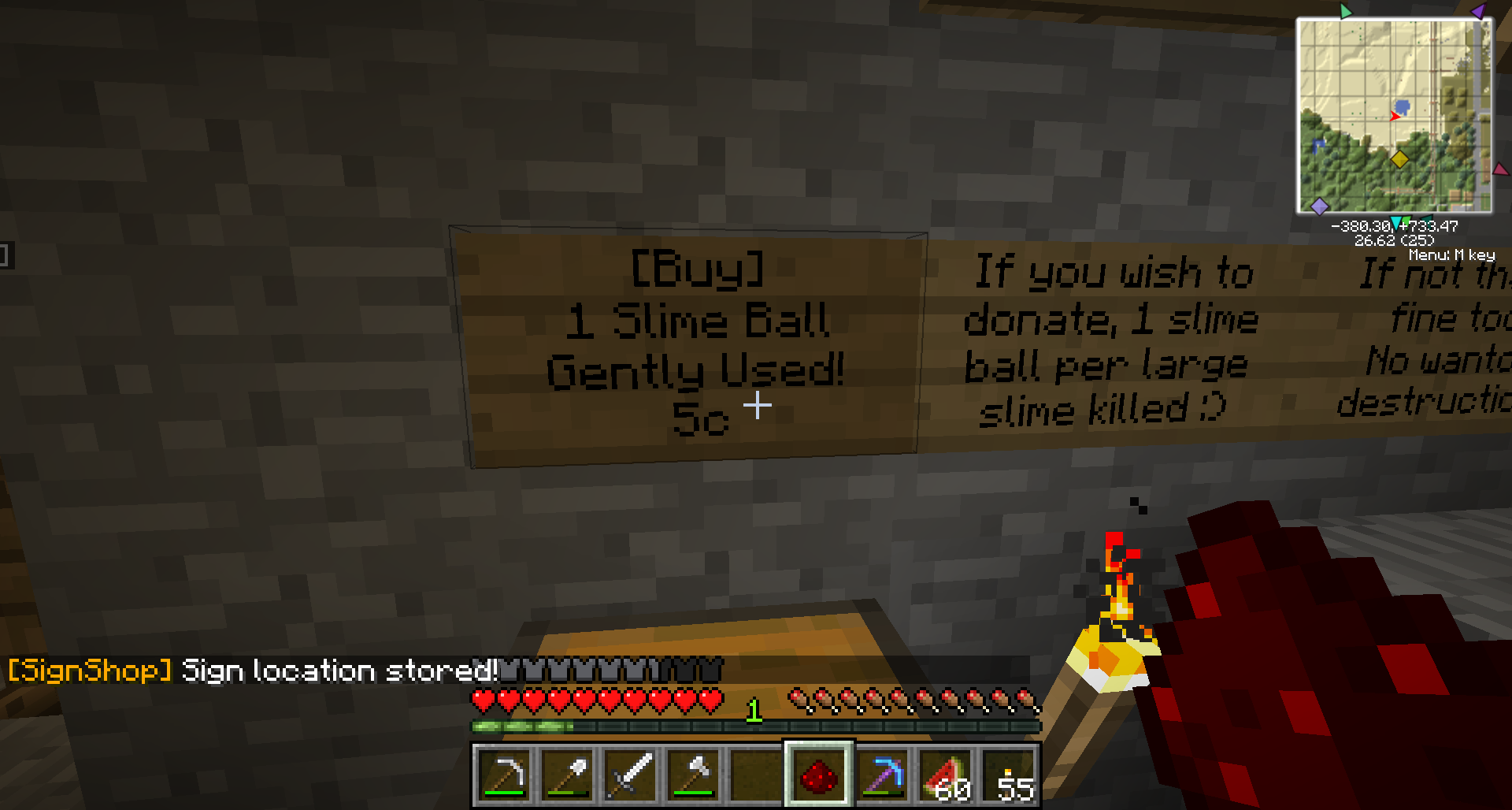
Then I set up the sign, and left or right click on the sign while holding redstone dust.
Lastly, I left click on the chest containing the single slime ball while holding redstone dust.
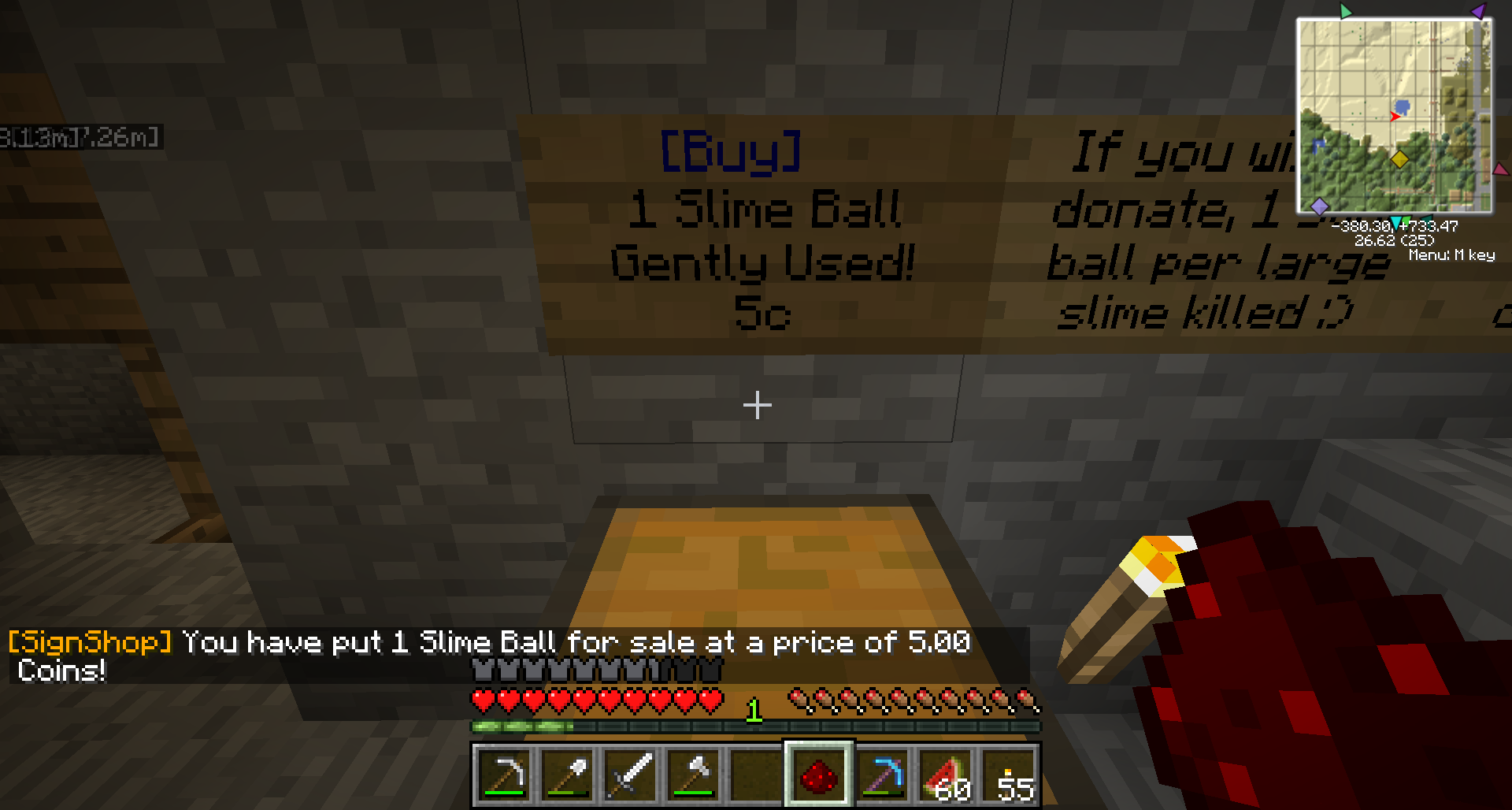
Note the status messages after each step. If I am putting multiple items up for sale from one sign (ie an "iron golem DIY kit" containing 4 iron blocks and 1 pumpkin), the last status message will summarise all the items that will be sold per transaction. Always check the last line to ensure that there are no mistakes! It is possible to accidentally set the shop up to sell multiple items for the price of 1, or sell the items in the shop for 0.00 coins.
Remember to lock your chests!
Buying items ([Sell] signs)
Similarly, [Sell] signs allow the player to sell things to you - if you are the owner of a shop and want to allow players to sell you items for a fee, this is the sign you want to use.
The syntax for a [Sell] sign is the same as a [Buy] one:
- The first line has to just contain the text: [Sell]
- The second and third line can contain any text. These are commonly used to describe the item you want to buy.
- The fourth line can contain any text, but must contain a number in the form X, or X.YZ on the line somewhere.
For example,
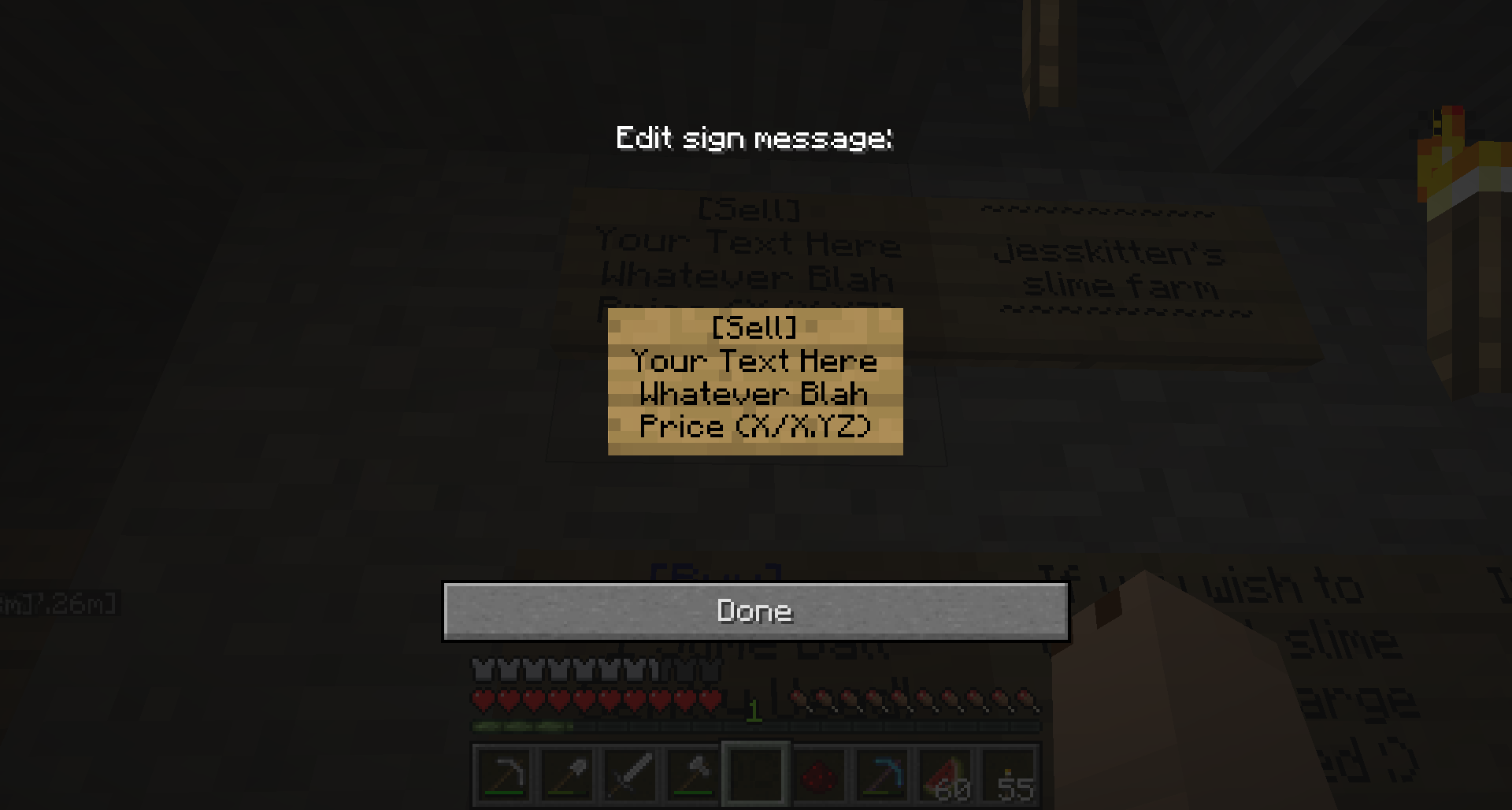
You then select a target chest and fill it with EXACTLY the number of items you want to buy per transaction. So if you want to set up a sign to buy 64 glass blocks at a time, you must first have 64 glass blocks, put that in the chest, and link the sign to it. You do not need to keep the source item in the chest, so after that you may remove the items in the chest, if you like.
So in this case, I will set up a sign to buy 1 slime ball for 0.75 coins. First I ensure that there is exactly 1 slime ball in the chest.
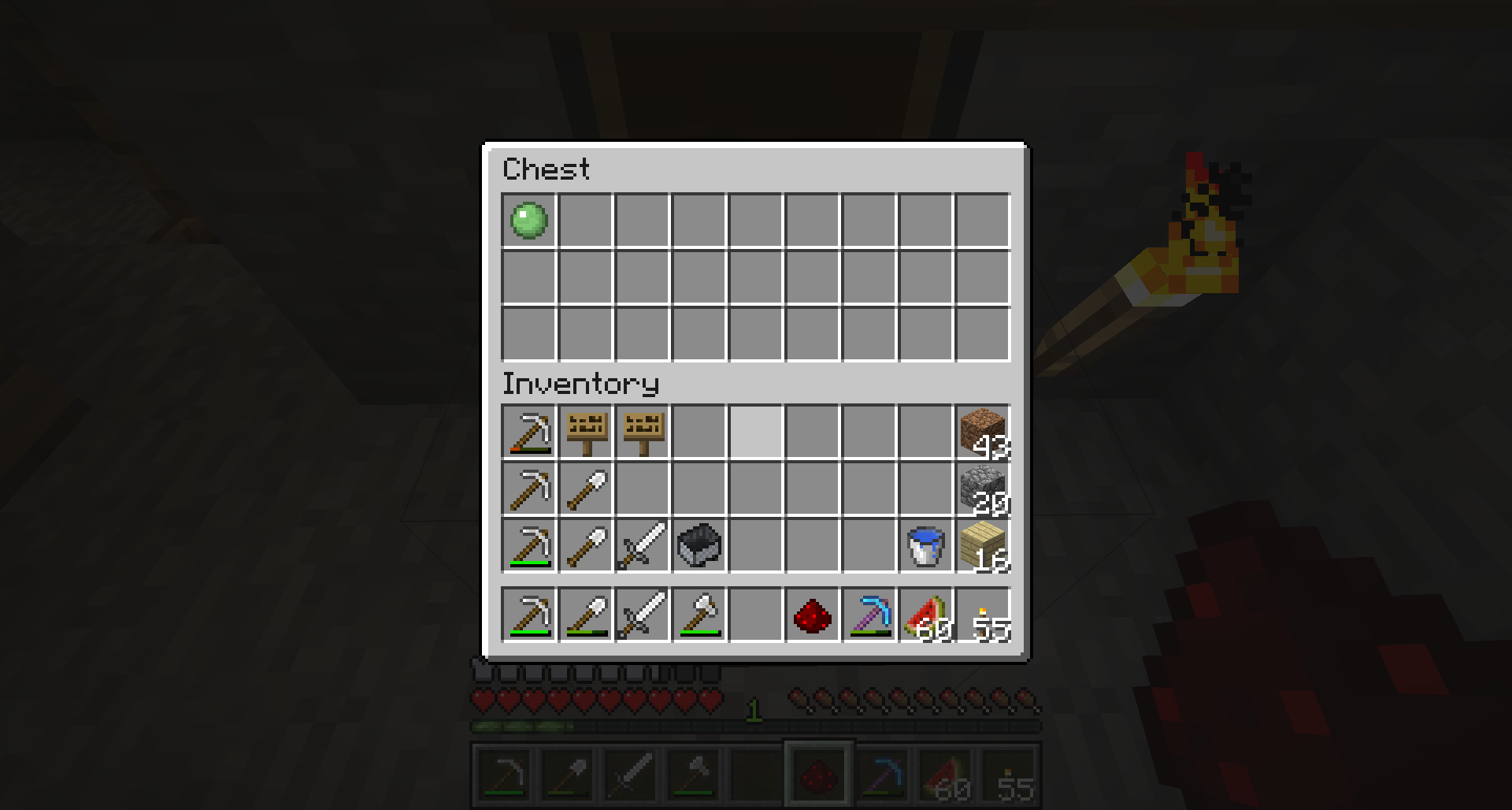
Then I set up the sign, and left or right click on the sign while holding redstone dust.
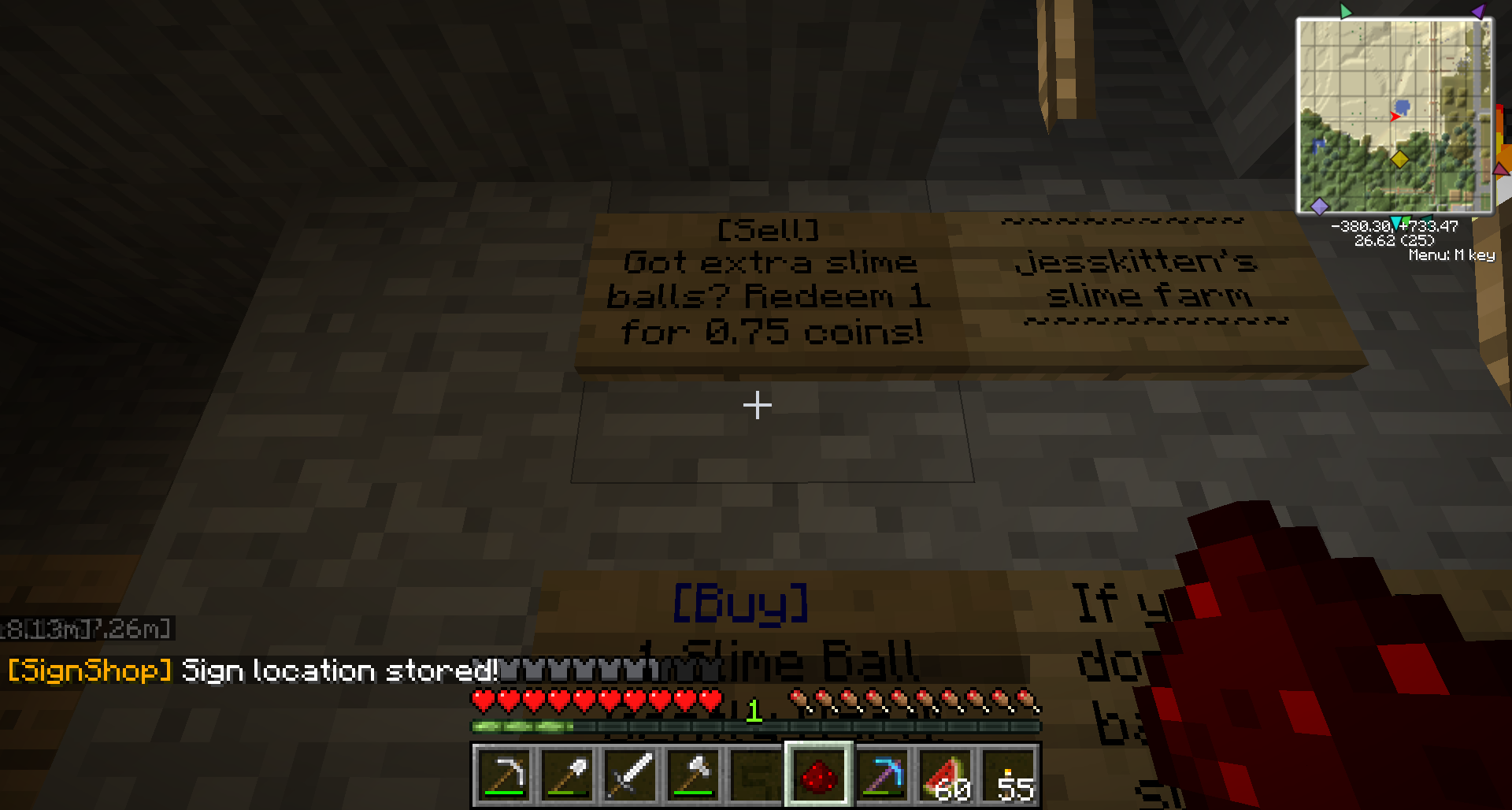
Lastly, I left click on the chest containing the single slime ball while holding redstone dust.
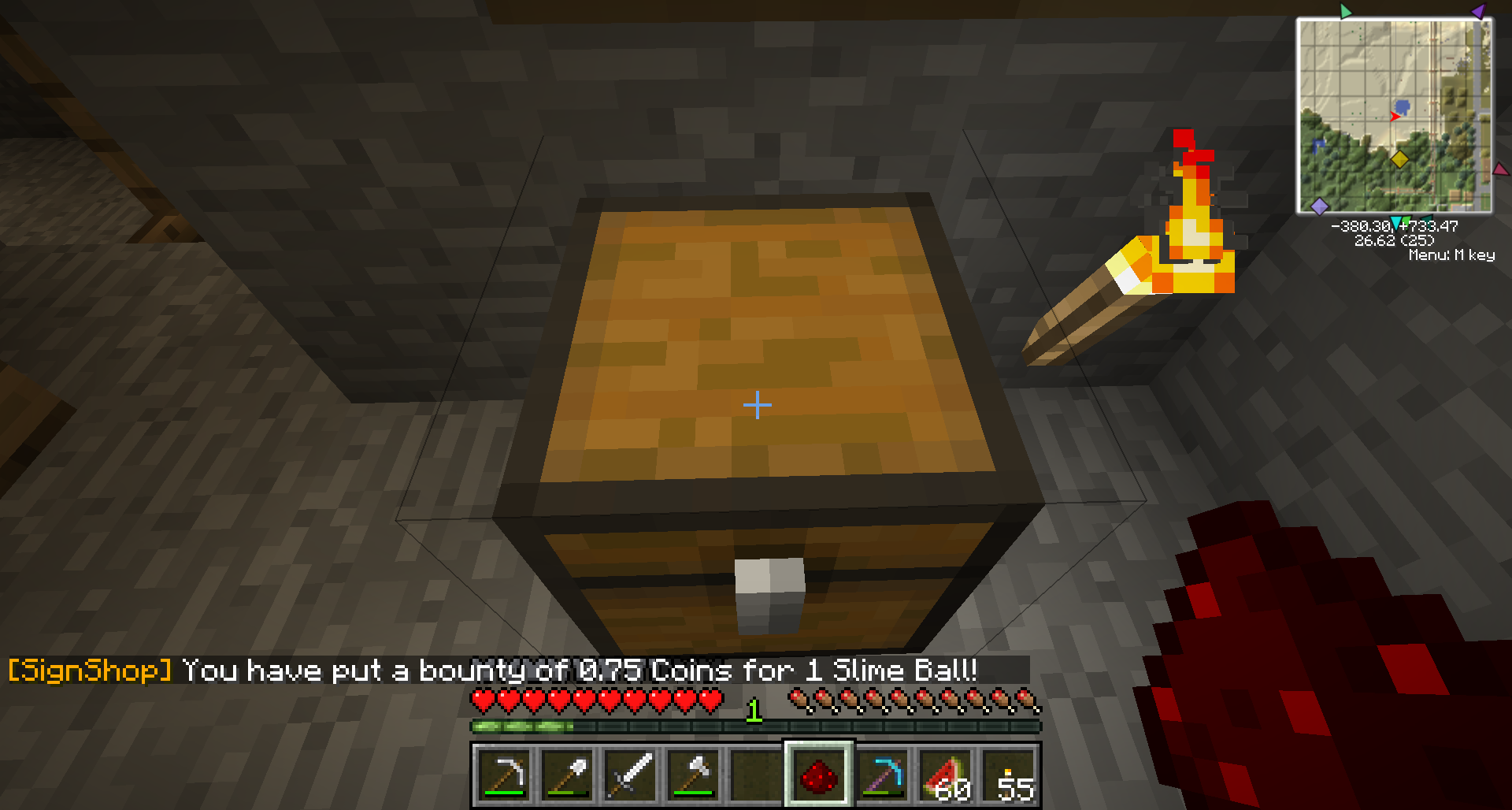
Note the status messages after each step. Be sure to check the item and price at the end. Also as a reminder again, you may remove the items in the chest after doing this, if you like.
Remember to lock your chests!
Donate items ([Donate] signs)
[Donate] signs are set up exactly the same way as [Buy]/[Sell] signs. These are seldom used because they are tied specifically to only one item. Some possible uses for these are for the customer to donate back wooden bowls after buying and consuming your wooden bowls, sorting large amounts of resource stacks, donating dye items (which do not work with [DonateHand] signs), or if t2t2 keeps griefing your [DonateHand] chest with seeds. Then again, it might not help that last case.
The syntax for a [Donate] sign is simpler:
- The first line has to just contain the text: [Donate]
- The other lines can contain any text. These are commonly used to describe what item the sign will take, and why.
For example,
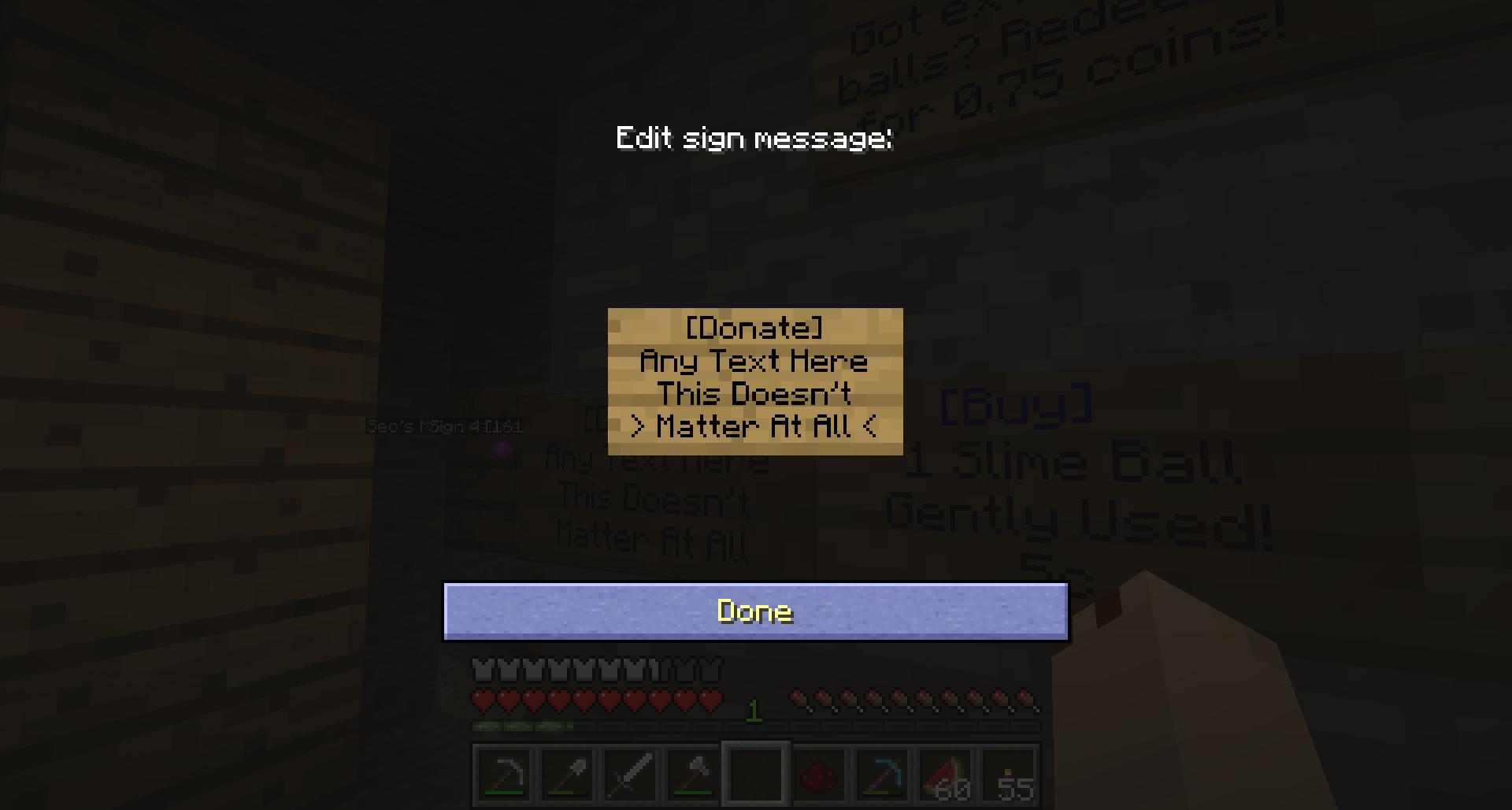
You then select a target chest and fill it with EXACTLY the number of items you want to get per donation. As before, you will need to actually own the correct number of the item you want to be donated to you, to set up the chest. You do not need to keep the source item in the chest after either, so you may remove the items in the chest after setting up the sign, if you like.
So in this case, I will set up a sign to allow the user to donate 1 slime ball to me. First I ensure that there is exactly 1 slime ball in the chest.
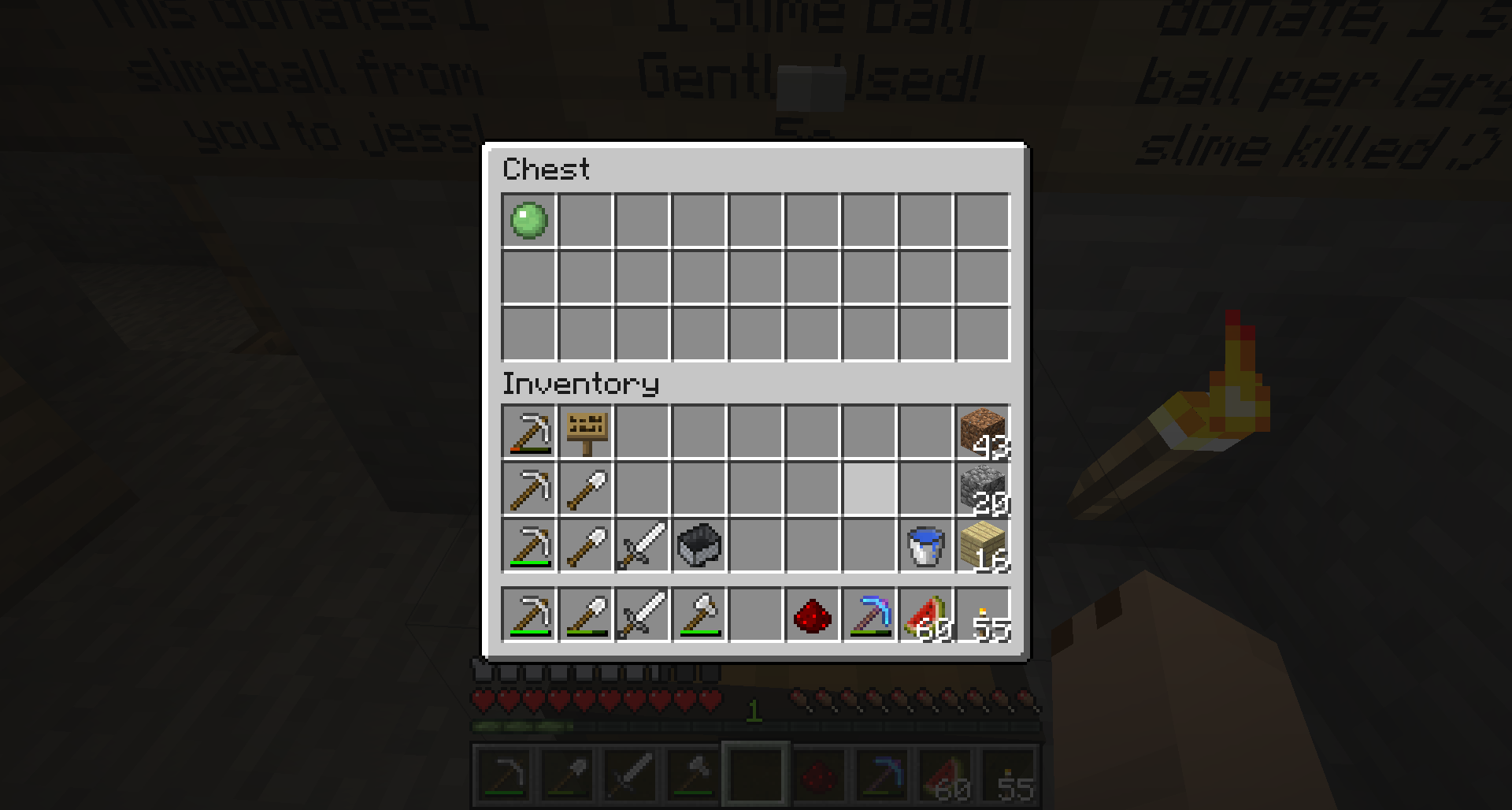
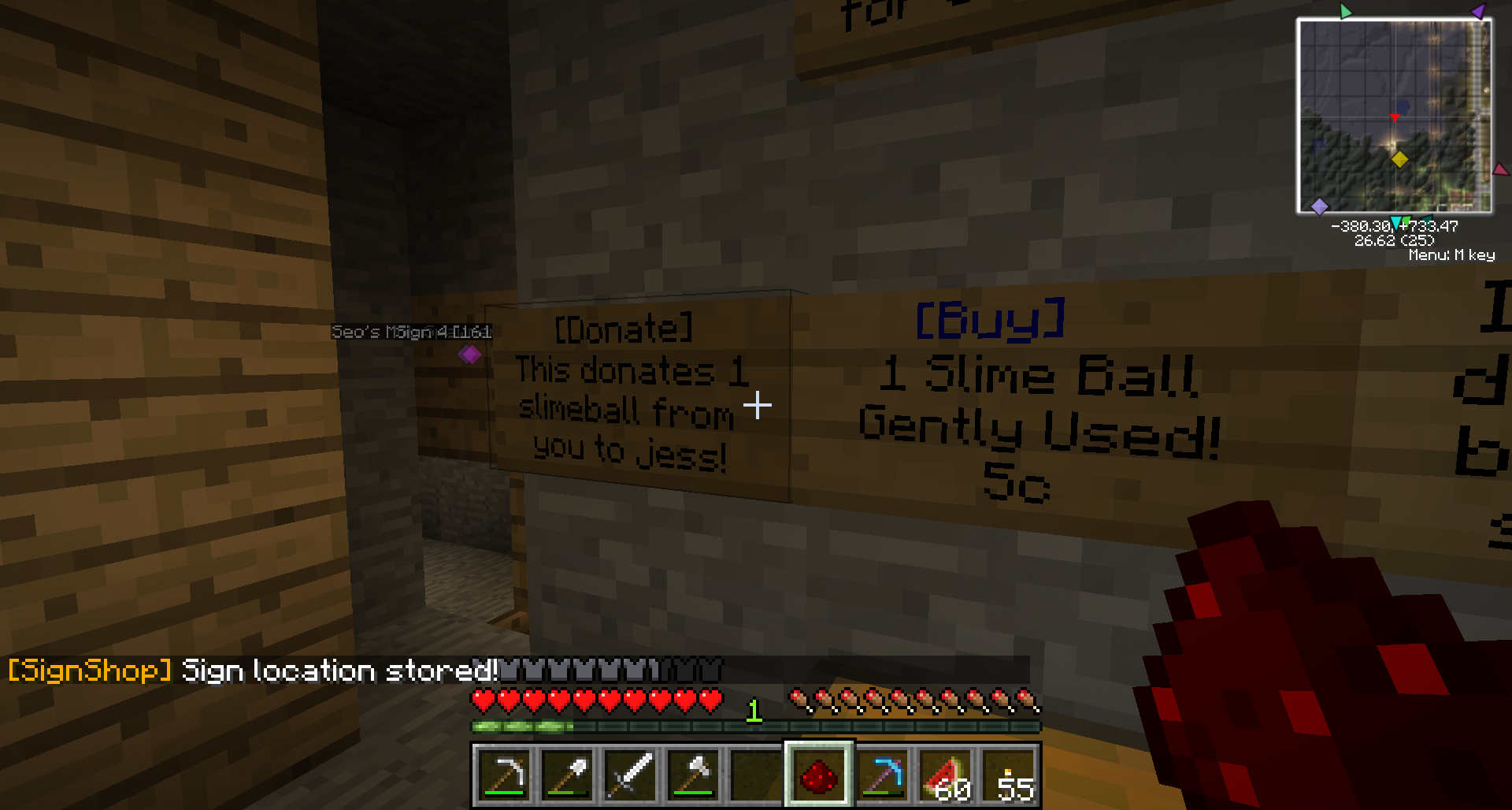
Then I set up the sign, and left or right click on the sign while holding redstone dust.
Lastly, I left click on the chest containing the single slime ball while holding redstone dust.
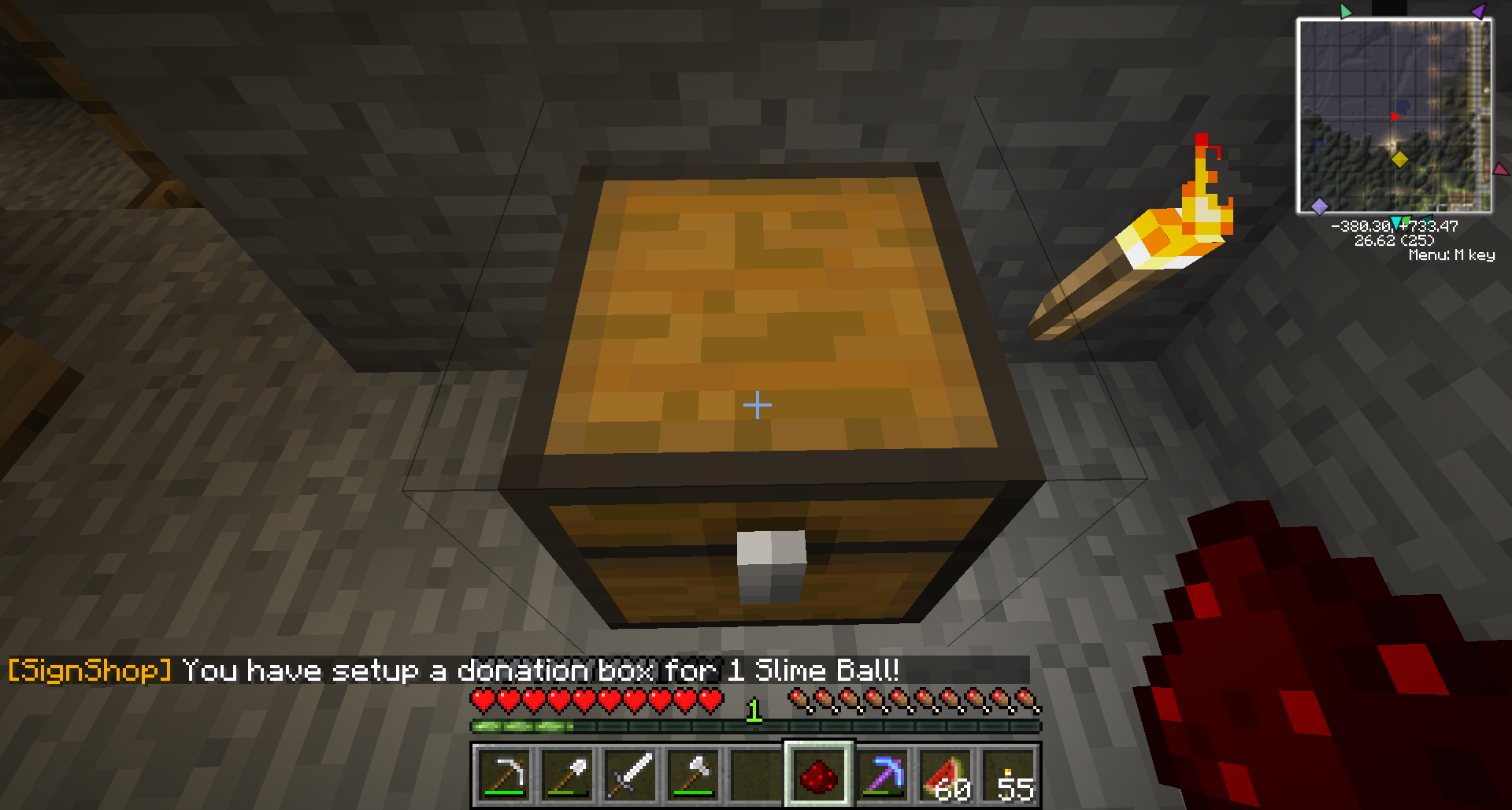
Note the status messages after each step. Be sure to check the item and quantity at the end. Also as a reminder again, you may remove the items in the chest after doing this, if you like.
Remember to lock your chests!
Generic Donation signs ([DonateHand] signs)
[DonateHand] signs allow the user to donate whatever item they are currently "holding" to the target chest. The user must put the item in their shortcut bar, select it, and then right click on your sign. They are easier to set up than the other signs, and are great because they are not tied to just any one item. They are often used as generic donation chests in shops, or in a mining outpost to donate resources back to your home base. Another use for them is to link one from your house to the donation chests in Leoville spawn, so that you can quickly restock those chests with extra stuff.
The syntax for a [DonateHand] sign is the same as a [Donate] one:
- The first line has to just contain the text: [DonateHand]
- The other lines can contain any text. These are commonly used to describe where the donation will go to.
For example,
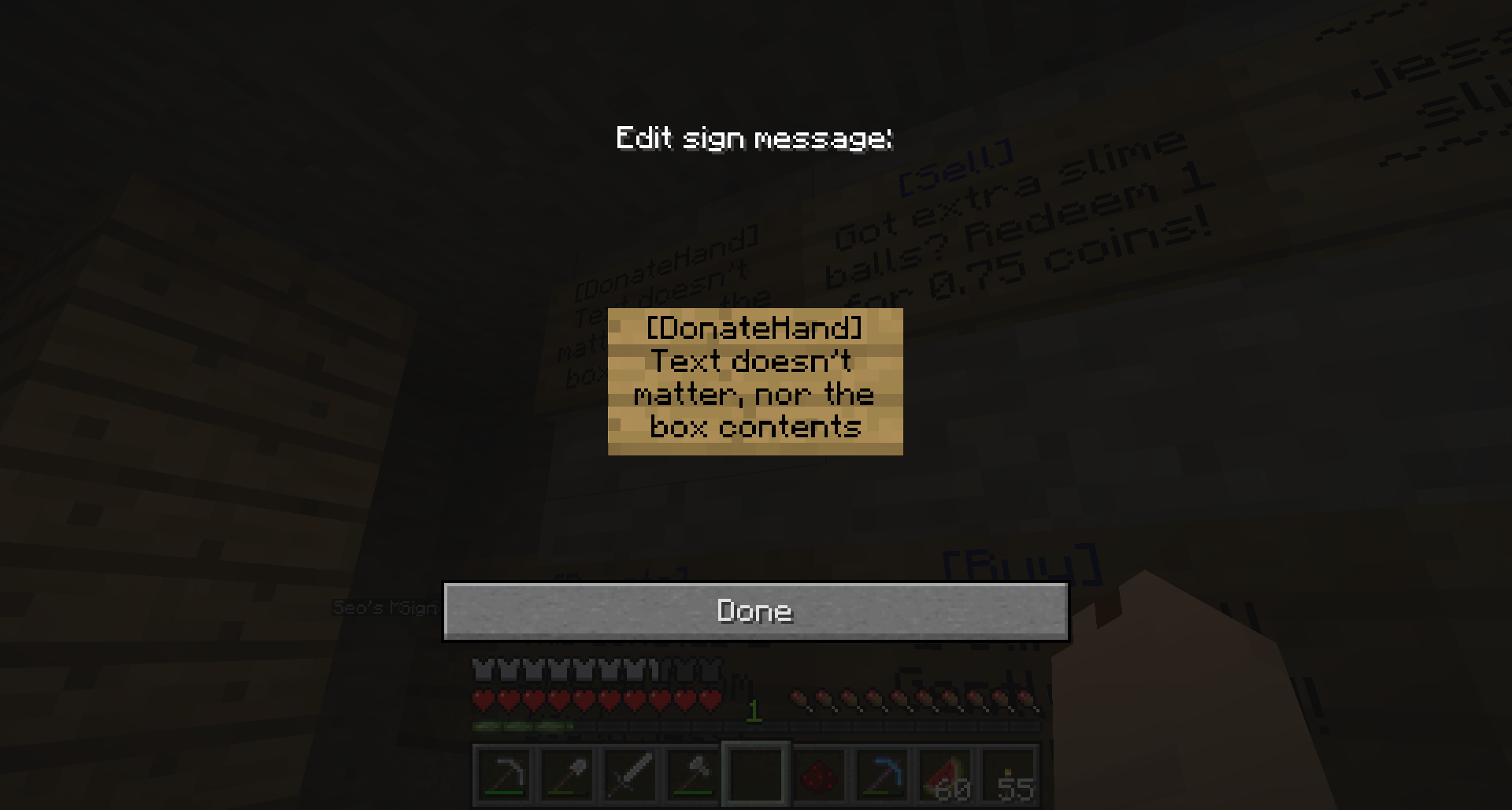
You then hit the sign with redstone, select a target chest and hit that too, and that's it! You must be able to normally use the chest, if the chest is locked and you are not on the access list then you will not be able to make that chest the target of your [DonateHand] sign either.
So in this case, I will set up a sign to allow the user to donate an item back to a chest at my house. First I set up the sign, and left or right click on the sign while holding redstone dust.
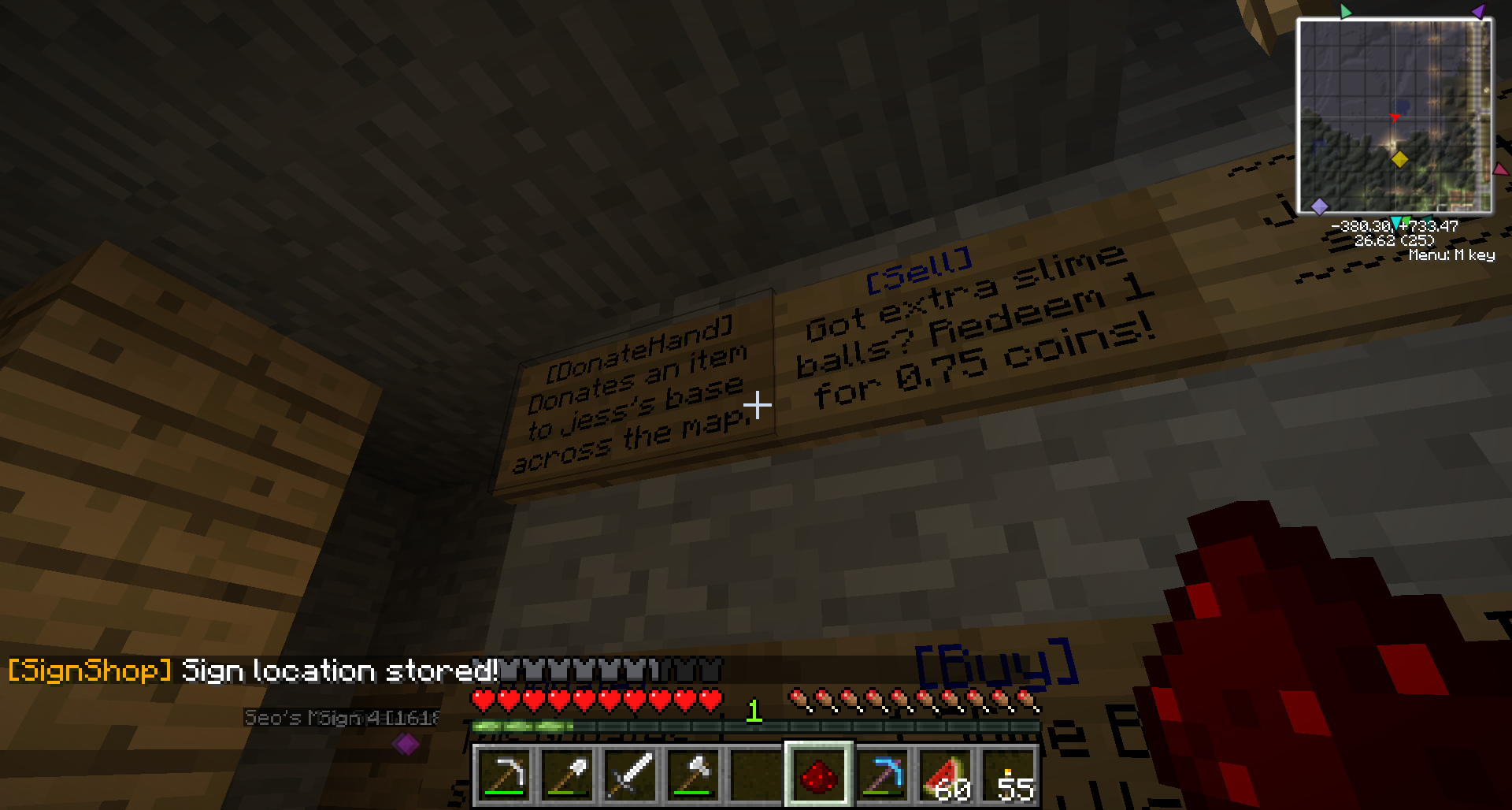
Then I go to where my target chest is, and left click on the chest while holding redstone dust.

And that's it! Now I can donate all manner of items from where my sign is, to where my chest is, as long as the chest has room in it. You cannot donate dye items to [DonateHand] chests, though, nor redstone dust, as they are linked to other Signshop functions.
Remember to lock your chests!
Frequently Asked Questions
Q: Hi! I'm a shopper, but I'm not sure what this sign is buying or selling?
A: LEFT click on the sign to check what the shop is buying or selling before right clicking on it to complete the transaction! When you left click on the sign, the game tells you the exact transaction that the sign involves.
Q: What does a red sign mean?
A: It usually means either the linked chest is empty (for [Buy] signs), or full (for [Sell], [Donate], or [DonateHand] signs).
Q: But I just restocked all the items in the chest! And added a new item! And all the [Buy] signs (but one) still show red!
A: To force the signs to update in these cases, left click on any of the signs. All the linked signs should update and turn blue as appropriate.
Q: Can I link more than one sign to a chest?
A: Yes. You can link multiple [Buy], [Sell], [Donate], [DonateHand], or combinations thereof to a single chest. You can sell several different items linked to different signs but keep all the stock in a single chest, you just have to remove all the items each time you want to add a new item for sale from that chest. A bit more of a hassle, but less chests cluttering up the place.
Q: Can I link more than one chest to a sign? (Say if the first one becomes full)
A: Sadly not!
Q: Do connections between the signs and their linked chests work across different (Multiverse) worlds?
A: They sure do!
Q: Is there a way to make a [Sell] or [Donate] sign for an item I don't have?
A: Nope, not without at least borrowing the item from someone else.
Q: It says, "The sign you clicked doesn't have a valid operation!" when I try to set up a sign.
A: You have to capitalise the B in [Buy], S in [Sell], D in [Donate], and both the D and H in [DonateHand]. Everything else must be in lowercase.
Q: It says, "Please hit the sign with the new info first." when I try to use a sign.
A: You're trying to use a sign while holding a dye item. Hold something else (or nothing) and try again. If you are trying to use a [DonateHand] sign with that item, well, you can't. See Bugs section at the top.
Q: It says, "Can you build? Yes." or "WorldGuard: No defined regions here!" (or other weird messages)
A: You're trying to use a sign while holding an item that has another defined action for right-clicking from another mod. In the case of the two examples given here, that's when you are holding string and WorldGuard is installed/configured.
Q: Can you 'limit' the amount of an item you want to buy? So someone doesn't clean me out of all my money selling me stacks of glass when I only really want to buy 1 or 2 at a time and pay a fair price for it?
A: Kind of, to an extent. Say if you only wanted to buy a maximum of 5 stacks of an item, you could fill the linked chest with junk so that there are only 5 spots open in the chest, with the rest of the spots containing 1 seed in each, or something like that. Similarly with half-stacks, though they're tougher to do as you need more of a source item. If you wanted to buy a half a stack of books, you could fill the rest of the chest with spare junk, and have a half-stack of books already in there so any sellers would only be able to fill up the rest of it before the chest runs out of stock.
<More coming -- suggest!>
Hope that helps!
Hello! This is a screenshot tutorial of how to create the four basic and most common types of Signshop signs, [Buy], [Sell], [Donate] and [DonateHand]. Actually [Donate] signs are very rare but they're a hybrid of the [Buy]/[Sell] ones and the [DonateHand] ones, and I had an extra sign on hand, so I put that in too. Sorry.
SOME COMMON BUGS
- If you are setting up a [Buy] or [Sell] sign, DO NOT INCLUDE MORE THAN ONE PERIOD IN THE LAST LINE (price). The item will be flagged as being on sale for 0.00 coins!
- You cannot use signs while holding dye items (bonemeal, cacti, lapis lazuli, etc) because they're linked to some sign replace function in the Signshop code. Therefore you cannot donate them, nor redstone dust, using [DonateHand] signs, even though that Signshop functionality is disabled for us mortals. Regular [Buy], [Sell] and [Donate] signs work though as we do not have to be holding those items to use those signs.
- As of last patch, the first line of the sign ([Buy], [Sell], etc) gets indented weirdly once the link between the sign and chest has been set up. Looks very strange.
- As of last patch, you sometimes cannot break a sign ([Buy], [Sell], etc) once the link has been set up and the first line has turned blue. To get around this, break the block the sign is attached to and it should pop free.
This guide hasn't been updated for the latest plugin version. The only difference is that you must punch the chest before the sign.
Selling items ([Buy] signs)
[Buy] Signs allow the player to buy things from you - if you are the owner of a shop and want to sell things to customers, this is the sign you want to use.
To create a [Buy] sign, place a sign with the following syntax:
- The first line has to just contain the text: [Buy]
- The second and third line can contain any text. These are commonly used to describe the item/s on sale.
- The fourth line can contain any text, but must contain a number in the form X, or X.YZ on the line somewhere. It doesn't matter if you put $X.YZ, X pennies, X cheetoes, or whatever currency you want to call it. The number just has to be there.
For example,
You must also ensure you select a target chest, and fill it with EXACTLY the type and number of items you want to sell per transaction. Be careful, if you wanted to sell 1 diamond, and you put a stack of 5 in and set up the connection between the sign and the chest, it will sell all 5 diamonds to the first person that clicks on the sign wanting to buy one! Instead you must put 1 diamond in, set up the connection, and then put the other 4 in to make sure your shop has enough stock.
So in this case, I will set up a sign to sell 1 slime ball for 5 coins. First I ensure that there is exactly 1 slime ball in the chest I want to use to store my stock.
Then I set up the sign, and left or right click on the sign while holding redstone dust.
Lastly, I left click on the chest containing the single slime ball while holding redstone dust.
Note the status messages after each step. If I am putting multiple items up for sale from one sign (ie an "iron golem DIY kit" containing 4 iron blocks and 1 pumpkin), the last status message will summarise all the items that will be sold per transaction. Always check the last line to ensure that there are no mistakes! It is possible to accidentally set the shop up to sell multiple items for the price of 1, or sell the items in the shop for 0.00 coins.
Remember to lock your chests!
Buying items ([Sell] signs)
Similarly, [Sell] signs allow the player to sell things to you - if you are the owner of a shop and want to allow players to sell you items for a fee, this is the sign you want to use.
The syntax for a [Sell] sign is the same as a [Buy] one:
- The first line has to just contain the text: [Sell]
- The second and third line can contain any text. These are commonly used to describe the item you want to buy.
- The fourth line can contain any text, but must contain a number in the form X, or X.YZ on the line somewhere.
For example,
You then select a target chest and fill it with EXACTLY the number of items you want to buy per transaction. So if you want to set up a sign to buy 64 glass blocks at a time, you must first have 64 glass blocks, put that in the chest, and link the sign to it. You do not need to keep the source item in the chest, so after that you may remove the items in the chest, if you like.
So in this case, I will set up a sign to buy 1 slime ball for 0.75 coins. First I ensure that there is exactly 1 slime ball in the chest.
Then I set up the sign, and left or right click on the sign while holding redstone dust.
Lastly, I left click on the chest containing the single slime ball while holding redstone dust.
Note the status messages after each step. Be sure to check the item and price at the end. Also as a reminder again, you may remove the items in the chest after doing this, if you like.
Remember to lock your chests!
Donate items ([Donate] signs)
[Donate] signs are set up exactly the same way as [Buy]/[Sell] signs. These are seldom used because they are tied specifically to only one item. Some possible uses for these are for the customer to donate back wooden bowls after buying and consuming your wooden bowls, sorting large amounts of resource stacks, donating dye items (which do not work with [DonateHand] signs), or if t2t2 keeps griefing your [DonateHand] chest with seeds. Then again, it might not help that last case.
The syntax for a [Donate] sign is simpler:
- The first line has to just contain the text: [Donate]
- The other lines can contain any text. These are commonly used to describe what item the sign will take, and why.
For example,
You then select a target chest and fill it with EXACTLY the number of items you want to get per donation. As before, you will need to actually own the correct number of the item you want to be donated to you, to set up the chest. You do not need to keep the source item in the chest after either, so you may remove the items in the chest after setting up the sign, if you like.
So in this case, I will set up a sign to allow the user to donate 1 slime ball to me. First I ensure that there is exactly 1 slime ball in the chest.
Then I set up the sign, and left or right click on the sign while holding redstone dust.
Lastly, I left click on the chest containing the single slime ball while holding redstone dust.
Note the status messages after each step. Be sure to check the item and quantity at the end. Also as a reminder again, you may remove the items in the chest after doing this, if you like.
Remember to lock your chests!
Generic Donation signs ([DonateHand] signs)
[DonateHand] signs allow the user to donate whatever item they are currently "holding" to the target chest. The user must put the item in their shortcut bar, select it, and then right click on your sign. They are easier to set up than the other signs, and are great because they are not tied to just any one item. They are often used as generic donation chests in shops, or in a mining outpost to donate resources back to your home base. Another use for them is to link one from your house to the donation chests in Leoville spawn, so that you can quickly restock those chests with extra stuff.
The syntax for a [DonateHand] sign is the same as a [Donate] one:
- The first line has to just contain the text: [DonateHand]
- The other lines can contain any text. These are commonly used to describe where the donation will go to.
For example,
You then hit the sign with redstone, select a target chest and hit that too, and that's it! You must be able to normally use the chest, if the chest is locked and you are not on the access list then you will not be able to make that chest the target of your [DonateHand] sign either.
So in this case, I will set up a sign to allow the user to donate an item back to a chest at my house. First I set up the sign, and left or right click on the sign while holding redstone dust.
Then I go to where my target chest is, and left click on the chest while holding redstone dust.
And that's it! Now I can donate all manner of items from where my sign is, to where my chest is, as long as the chest has room in it. You cannot donate dye items to [DonateHand] chests, though, nor redstone dust, as they are linked to other Signshop functions.
Remember to lock your chests!
Frequently Asked Questions
Q: Hi! I'm a shopper, but I'm not sure what this sign is buying or selling?
A: LEFT click on the sign to check what the shop is buying or selling before right clicking on it to complete the transaction! When you left click on the sign, the game tells you the exact transaction that the sign involves.
Q: What does a red sign mean?
A: It usually means either the linked chest is empty (for [Buy] signs), or full (for [Sell], [Donate], or [DonateHand] signs).
Q: But I just restocked all the items in the chest! And added a new item! And all the [Buy] signs (but one) still show red!
A: To force the signs to update in these cases, left click on any of the signs. All the linked signs should update and turn blue as appropriate.
Q: Can I link more than one sign to a chest?
A: Yes. You can link multiple [Buy], [Sell], [Donate], [DonateHand], or combinations thereof to a single chest. You can sell several different items linked to different signs but keep all the stock in a single chest, you just have to remove all the items each time you want to add a new item for sale from that chest. A bit more of a hassle, but less chests cluttering up the place.
Q: Can I link more than one chest to a sign? (Say if the first one becomes full)
A: Sadly not!
Q: Do connections between the signs and their linked chests work across different (Multiverse) worlds?
A: They sure do!
Q: Is there a way to make a [Sell] or [Donate] sign for an item I don't have?
A: Nope, not without at least borrowing the item from someone else.
Q: It says, "The sign you clicked doesn't have a valid operation!" when I try to set up a sign.
A: You have to capitalise the B in [Buy], S in [Sell], D in [Donate], and both the D and H in [DonateHand]. Everything else must be in lowercase.
Q: It says, "Please hit the sign with the new info first." when I try to use a sign.
A: You're trying to use a sign while holding a dye item. Hold something else (or nothing) and try again. If you are trying to use a [DonateHand] sign with that item, well, you can't. See Bugs section at the top.
Q: It says, "Can you build? Yes." or "WorldGuard: No defined regions here!" (or other weird messages)
A: You're trying to use a sign while holding an item that has another defined action for right-clicking from another mod. In the case of the two examples given here, that's when you are holding string and WorldGuard is installed/configured.
Q: Can you 'limit' the amount of an item you want to buy? So someone doesn't clean me out of all my money selling me stacks of glass when I only really want to buy 1 or 2 at a time and pay a fair price for it?
A: Kind of, to an extent. Say if you only wanted to buy a maximum of 5 stacks of an item, you could fill the linked chest with junk so that there are only 5 spots open in the chest, with the rest of the spots containing 1 seed in each, or something like that. Similarly with half-stacks, though they're tougher to do as you need more of a source item. If you wanted to buy a half a stack of books, you could fill the rest of the chest with spare junk, and have a half-stack of books already in there so any sellers would only be able to fill up the rest of it before the chest runs out of stock.
<More coming -- suggest!>
Hope that helps!
Last edited by jesskitten on 21 May 2012, 22:16, edited 6 times in total.
Meow!

Re: [How-To] Using Signshop
by t2t2 » 21 May 2012, 00:43
Confirmed as awesome (and factual)
and I approve of this
jesskitten wrote:or if t2t2 keeps griefing your [DonateHand] chest with seeds. Then again, it might not help that last case.
and I approve of this
- jesskitten
-
- Posts: 22
- Joined: 25 Apr 2012, 13:55
- Location: Trouble
- Minecraft username: jesskitten
Re: [How-To] Using Signshop
by jesskitten » 21 May 2012, 01:03
Hehe.
Neat and thanks. Tried to make a table of contents but couldn't figure out a way to make anchors with no HTML code (I think).. if there's a BBcode way someone please let me know, thanks.
Neat and thanks. Tried to make a table of contents but couldn't figure out a way to make anchors with no HTML code (I think).. if there's a BBcode way someone please let me know, thanks.
Meow!

Re: [How-To] Using Signshop
by Demonfive » 21 May 2012, 20:43
You're my favorite person in the world. I've been meaning to write a SignShop guide for a long time, but never got around to it. Thank you.

Re: [How-To] Using Signshop
by t2t2 » 11 Oct 2012, 11:19
Note: In the current version of the signshop plugin you have to punch chest first and then the sign.
- limdaniel223
- Posts: 9
- Joined: 11 Nov 2013, 02:12
- Minecraft username: ethanbulider
Re: [How-To] Using Signshop
by limdaniel223 » 23 Nov 2013, 23:56
So is it possible to connect multiple signs and chest at once?
For example like I press five chests with red stone and go to where I built my market and press five signs.
For example like I press five chests with red stone and go to where I built my market and press five signs.

Re: [How-To] Using Signshop
by TehRage » 24 Nov 2013, 05:29
nope.
each have to happen in a specific order for them to activate
each have to happen in a specific order for them to activate

Re: [How-To] Using Signshop
by sazafar x » 06 Mar 2014, 17:45
This guide was very helpful thank you for the help! 

Re: [How-To] Using Signshop
by Sumurai8 » 18 Apr 2014, 03:14
I am confused. I made a sign with [DonateHand] in the first line. When I click with 1 redstone on it, it says "You need to link at least one chest for this shop type!". When I left-click a chest with a redstone, it says "Stored location of Chest Facing West containing nothing.". Then if I click the sign with the redstone again, it says "The shop is empty!". I have no clue how to fix that.
- SWfan85
-

- Posts: 161
- Joined: 19 Apr 2013, 01:04
- Location: Connecticut, USA
- Minecraft username: SWfan85
Re: [How-To] Using Signshop
by SWfan85 » 18 Apr 2014, 03:45
You need to click the chest first, then the sign.
Chargé d'affaires - L'Ambassade de la Louisiane
Proprietor - Rougaroux Plantation & Distillery (Farm & Specialty Potions)
@swfan85
Proprietor - Rougaroux Plantation & Distillery (Farm & Specialty Potions)
@swfan85
Re: [How-To] Using Signshop
by Sumurai8 » 18 Apr 2014, 05:48
SWfan85 wrote:You need to click the chest first, then the sign.
But then it says that "the shop is empty", not that I have succesfully set up a donation box.
- SWfan85
-
- Posts: 161
- Joined: 19 Apr 2013, 01:04
- Location: Connecticut, USA
- Minecraft username: SWfan85
Re: [How-To] Using Signshop
by SWfan85 » 18 Apr 2014, 06:08
The others will correct me if I'm wrong, but I think that you need to have something in the chest when you try to link.
Chargé d'affaires - L'Ambassade de la Louisiane
Proprietor - Rougaroux Plantation & Distillery (Farm & Specialty Potions)
@swfan85
Proprietor - Rougaroux Plantation & Distillery (Farm & Specialty Potions)
@swfan85

Re: [How-To] Using Signshop
by asim0v » 18 Apr 2014, 07:02
SWfan85 wrote:The others will correct me if I'm wrong, but I think that you need to have something in the chest when you try to link.
Yes, you want the exact amount you are going to sell (e.g. 6 of an item if you are selling a six-pack, one if they are singles) and only that item in the chest already before you try to link it. For a [DonateHand] sign, just put something in it, doesn't matter what but there needs to be something inside.
Pro Tip: You can have more than one sign linked to a chest, and you can have more than one item being sold from the same chest. Just make sure you have only the items you want to sell from the sign when you link it. For example, you can have a single chest with say 4 different types of potions linked to 4 separate sell signs each selling a different type of potion.

14 posts
• Page 1 of 1
Who is online
Users browsing this forum: No registered users and 1 guest